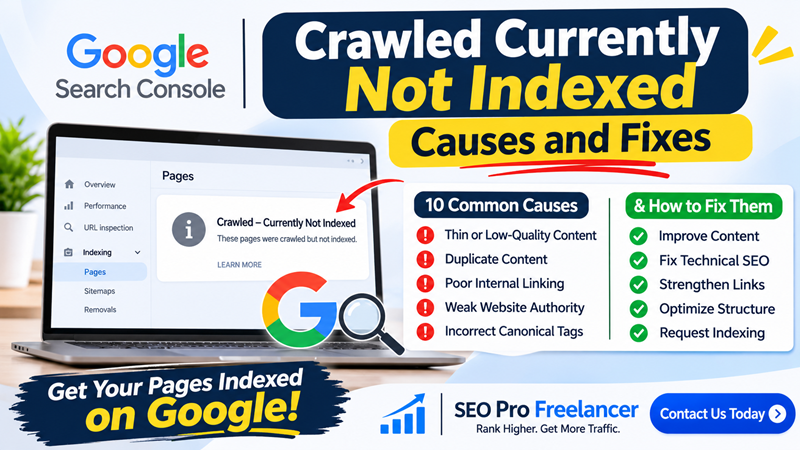
Have you checked Google Search Console and found the status “Crawled – Currently Not Indexed” for your website pages? This is a common indexing issue that can prevent your content from appearing in Google search results, even when Google has successfully discovered and crawled your URLs.
When Google crawls a page but does not add it to its index, that page cannot generate organic search traffic through normal Google search results. This can be frustrating, especially when you have invested time in creating content and optimizing your website.
The good news is that this status does not necessarily mean your website has a penalty or a technical error. In many cases, Google simply does not consider the page valuable enough to index at that time.
In this guide, we will explain what Crawled Currently Not Indexed means, its 10 common causes, and practical ways to fix the problem.
What Does Crawled – Currently Not Indexed Mean?
Crawled – Currently Not Indexed is a Google Search Console page indexing status. It means Googlebot successfully visited and crawled your webpage but decided not to include it in Google’s search index.
In simple terms:
- Google discovered your URL.
- Googlebot accessed and crawled the page.
- Google processed the page content.
- Google did not select the page for indexing.
This is different from a “Discovered – Currently Not Indexed” status, where Google knows the URL exists but has not crawled it yet.
It is important to understand that crawling does not guarantee indexing. Google evaluates several factors, including content quality, usefulness, duplication, and overall website quality, before deciding whether to index a page.
10 Common Causes of Crawled Currently Not Indexed
1. Thin or Low-Quality Content
One of the most common reasons pages remain outside Google’s index is insufficient content.
If your webpage contains only a few sentences, generic information, or little original value, Google may decide that it does not provide enough information for search users.
How to fix it:
- Expand content with useful information.
- Answer relevant user questions.
- Include original examples and insights.
- Add helpful FAQs where appropriate.
- Remove unnecessary filler content.
Focus on quality rather than simply increasing word count.
2. Duplicate Content Issues
Google may choose not to index a page if its content is substantially similar to another URL on your website or elsewhere on the internet.
For example, publishing multiple location pages with almost identical content and changing only the city name can create duplication concerns.
How to fix it:
- Create unique content for every important page.
- Consolidate unnecessary duplicate URLs.
- Use canonical tags correctly.
- Avoid publishing repetitive location pages.
- Add genuinely useful local information.
Each important page should offer a distinct reason for users to visit it.
3. Poor Internal Linking
Internal links help Google discover your website pages and understand their importance.
If a webpage has no internal links pointing to it, Google may have difficulty understanding its relationship with the rest of your website.
How to fix it:
- Link relevant blog posts together.
- Add links from important service pages.
- Use descriptive anchor text.
- Include important URLs in relevant navigation sections.
- Create topic clusters around your main services.
A well-organized internal linking structure improves website navigation and content discovery.
4. Weak Website Authority
New websites or websites with limited quality backlinks may struggle to get all their pages indexed.
If your website has little original content, limited recognition, and few relevant external references, Google may prioritize crawling other pages.
How to fix it:
- Publish valuable industry-related content.
- Build relevant, high-quality backlinks.
- Strengthen your website’s topical coverage.
- Improve internal linking.
- Develop a consistent SEO strategy.
Remember that backlinks are not a guaranteed indexing solution. They should support an overall quality-focused SEO strategy.
5. Incorrect Canonical Tags
Canonical tags tell search engines which URL should be treated as the preferred version of similar or duplicate pages.
If a page accidentally points its canonical tag to another URL, Google may decide not to index the original page.
How to fix it:
- Inspect the page’s canonical tag.
- Check the user-declared canonical URL.
- Compare it with Google’s selected canonical URL in Search Console.
- Correct incorrect canonical references.
- Ensure important pages use appropriate canonical tags.
Make sure your important pages identify the correct preferred URL.
6. Poor Website Structure
A confusing website structure can make it difficult for Google to understand how your pages relate to one another.
Important pages buried several clicks deep or disconnected from relevant sections may receive less attention.
How to fix it:
- Organize pages into logical categories.
- Create clear navigation menus.
- Use relevant internal links.
- Build topic-based content clusters.
- Keep important pages accessible.
A clear website architecture helps both search engines and visitors navigate your website.
7. Low-Value AI-Generated Content
AI tools can help with content creation, but publishing large volumes of generic, repetitive, or unedited AI-generated articles can create indexing challenges.
Google evaluates content based on quality and usefulness, not simply whether AI was involved in its creation.
How to fix it:
- Add original expertise and practical examples.
- Verify facts and information.
- Remove repetitive paragraphs.
- Include relevant images and supporting resources.
- Edit content to satisfy actual search intent.
Use AI as an assistant rather than a replacement for useful, original content.
8. Soft 404 and Page Quality Problems
Sometimes a webpage returns a successful HTTP status code but contains little meaningful content or behaves like a missing page.
These situations can create soft 404 or page-quality concerns.
How to fix it:
- Check the page’s HTTP response.
- Ensure the page contains meaningful content.
- Restore accidentally removed information.
- Redirect permanently removed pages where appropriate.
- Return a proper 404 or 410 status for genuinely unavailable pages.
Make sure every indexable URL provides a useful experience.
9. Slow Website Performance and Rendering Issues
If Googlebot experiences difficulties accessing important content or rendering your webpage, it may affect how Google processes the page.
JavaScript-heavy websites can sometimes create rendering problems when important content is not accessible properly.
How to fix it:
- Test important URLs using Google’s URL Inspection Tool.
- Review the rendered HTML.
- Ensure important content is accessible.
- Fix JavaScript rendering errors.
- Improve server response times.
- Optimize website performance.
A technically accessible website makes it easier for Google to process your content.
10. Your Content Does Not Provide Enough Unique Value
Sometimes a page is technically correct, contains sufficient text, and has no obvious indexing errors, but Google still decides not to index it.
This can happen when the page provides information that is already widely available elsewhere.
For example, publishing another generic article about SEO tips without original examples or meaningful insights may not give Google a strong reason to index it.
How to fix it:
- Analyze competing search results.
- Identify missing information.
- Add original research and examples.
- Improve content depth and relevance.
- Match the search intent more accurately.
Your goal should be to create a page that offers something genuinely useful.
How to Fix Crawled Currently Not Indexed in Google Search Console
If you are facing this issue across multiple website pages, follow this practical process:
Step 1: Open Google Search Console
Navigate to Pages under Indexing and open the Crawled – Currently Not Indexed report.
Step 2: Identify Affected URLs
Export the affected URLs and categorize them into blog posts, service pages, product pages, and other website sections.
Step 3: Inspect Individual URLs
Use the URL Inspection Tool to review indexing information, crawl details, and Google’s selected canonical URL.
Step 4: Improve Content Quality
Update thin, duplicated, outdated, or unhelpful content. Focus on adding original value.
Step 5: Review Technical SEO
Check robots.txt, canonical tags, noindex directives, HTTP status codes, and rendering problems.
Step 6: Strengthen Internal Linking
Add relevant internal links from indexed pages to the important URLs you want Google to discover.
Step 7: Request Indexing
Once you have improved the page, use the URL Inspection Tool to request indexing.
Requesting indexing does not guarantee inclusion in Google’s index. Google will evaluate the page again.
How Long Does It Take to Fix Crawled – Currently Not Indexed?
There is no guaranteed timeline for resolving this issue.
Some pages may get indexed after Google recrawls them, while others may remain excluded until their content, technical accessibility, or overall usefulness improves.
Avoid repeatedly requesting indexing without making meaningful improvements. Instead, monitor Google Search Console and review the status of your updated URLs over time.
Fix Your Website Indexing Issues with SEO Pro Freelancer
Are multiple pages on your website showing Crawled – Currently Not Indexed in Google Search Console?
Ignoring indexing problems can limit your website’s search visibility and prevent valuable pages from attracting organic traffic.
At SEO Pro Freelancer, we help businesses identify and resolve SEO issues through comprehensive website audits and data-driven optimization strategies.
Our SEO services include:
- Technical SEO audits and indexing analysis.
- Google Search Console error investigation.
- Website content optimization.
- Keyword research and competitor analysis.
- Internal linking optimization.
- Canonical tag and sitemap checks.
- Quality backlink-building strategies.
Whether you manage a new website or an established business website, we can help identify what is preventing your important pages from appearing in Google search results.
Want to get your website pages indexed on Google?
Contact SEO Pro Freelancer today for a professional SEO audit and discover the issues affecting your website’s indexing and organic visibility.
Let’s improve your website’s technical SEO foundation and build a strategy for sustainable organic growth.
Frequently Asked Questions (FAQs)
1. What does Crawled – Currently Not Indexed mean?
It means Google successfully crawled your webpage but has not added it to its search index. As a result, the page generally cannot appear in Google’s organic search results.
2. Is Crawled – Currently Not Indexed a Google penalty?
No. This status does not automatically indicate a Google penalty. It means Google has crawled the URL but has not selected it for indexing.
3. How can I fix Crawled – Currently Not Indexed?
Improve content quality, remove duplication, correct canonical tags, strengthen internal linking, and resolve technical SEO issues. Then request indexing through Google Search Console.
4. Does requesting indexing guarantee that Google will index my page?
No. Requesting indexing only asks Google to recrawl the URL. Google makes the final decision about whether the page qualifies for indexing.
5. Can backlinks help with indexing?
Relevant backlinks may help Google discover your pages and understand their importance. However, backlinks do not guarantee indexing. Content quality and technical accessibility remain important.
6. What is the difference between Discovered and Crawled – Currently Not Indexed?
Discovered – Currently Not Indexed means Google knows the URL exists but has not crawled it yet. Crawled – Currently Not Indexed means Googlebot has already visited the URL but has not indexed it.